Showing posts with label tips. Show all posts

Monday, February 18, 2013

solidworks: variable global to assembly

lately i've taken to the "make rough sketch of parts on paper, then in solidworks, make solidworks assembly, then add all the features at the correct location with the help of CAD" method of making things. With the lasercutter especially, something you want is that if you decide to change your stock (or you measure incorrectly), you can change the thickness of  your features all at once.

This puzzled me a while back, because if you try to enter an "equals" sign into the extrude feature to create a variable like you would when dimensioning a sketch, you get an error:

error to the left
Uh, so...? What? You can't use equations in features? That's dumb.
Thankfully that's not the case. Turns out you input whatever for the feature and click the check mark. Then you go back and double-click on that feature (in this case boss-extrude) in the feature tree,


 which pops up the "extrude" feature dimension on your model, 


which you can then double-click to edit. And insert an "=" sign to create a variable.

Okay, so that's great. But this variable only exists within this one file. How do I get it into other files?
I thought there would be some assembly feature, but instead solidworks does this with good ol' fashioned text files.

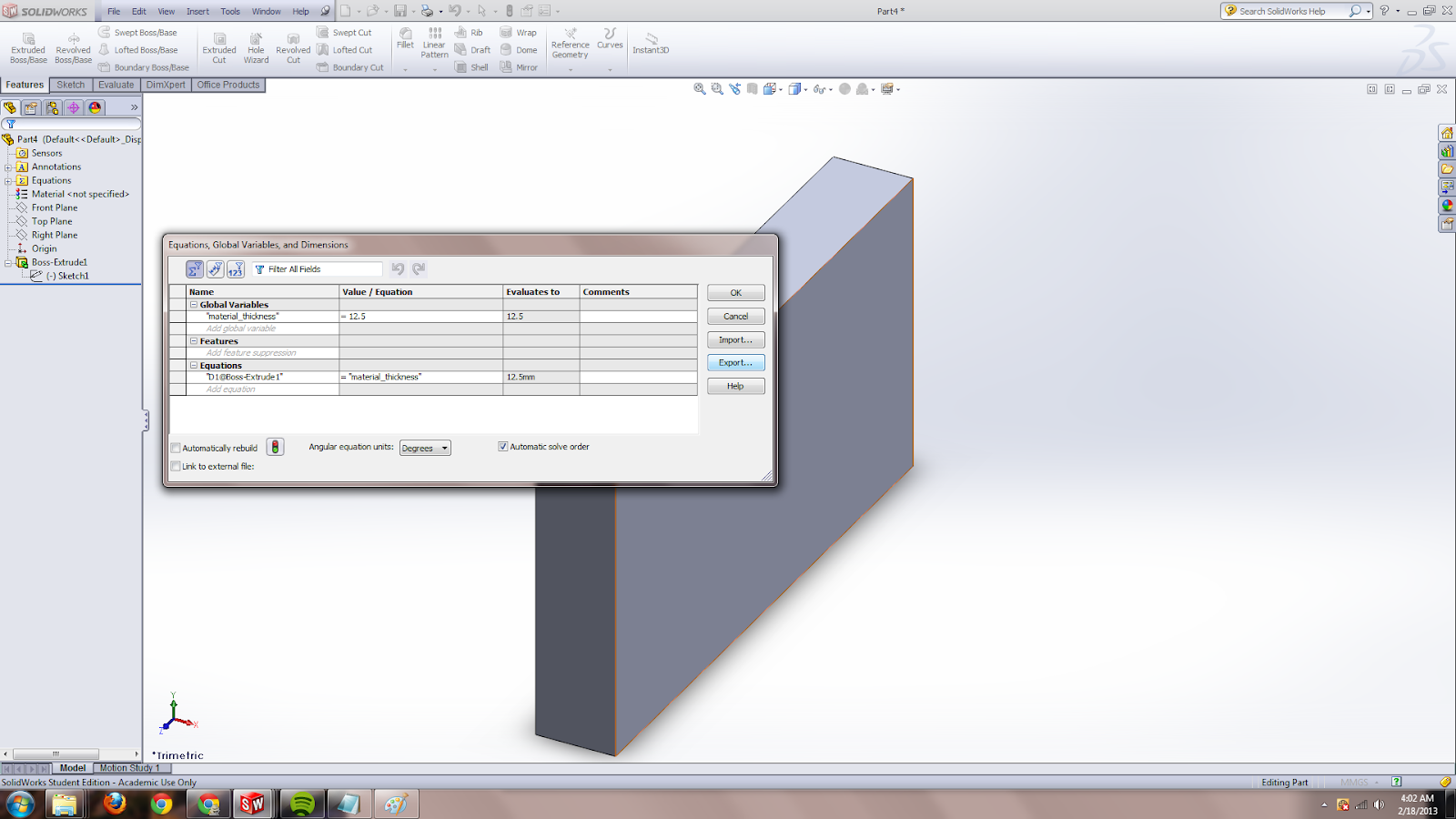
Tools > Equations > Export


There's the "material_thickness" variable I created as = 12.5, and then there's the "first extrude = material_thickness" which is sort of optional for exporting. All my features are meant for lasercutting so I may as well export the fact that the first extrude-boss should be of "material_thickness" thickness.

(That is, when I import in the future, I have to make sure the new file has an extrude already, or else the "equation is invalid" error will pop up because it's like "wtf there is no extrude thickness dimension to link to in this file". So probably best actually not to export that extrude thickness dimension, or else un-check that equation when importing).

This saves it as equations.txt

Then I create a new part (for demo purposes) and import the equations file:

And voila, everything has carried over.

NOTE: Watch your units! As you can see, the equations file doesn't have units. So if you export as 12.5 mm in one document and then import in a document that is set to work in inches, you get a 12.5 in part.

If I want to edit the variable, I have to do so externally. At the bottom of Tools > Equations, there's an "open file" button that I use and it pops open the equations.txt file in the default text editor (in this case notepad)


Voila, I can now edit that thickness and just hit "rebuild" (ctrl-b) 


and the new dimension is propagated in all the files.

If you want, going through this post as a slideshow may be flow better:
https://picasaweb.google.com/113942194695013581888/SolidworksGlobalVariable


Wednesday, February 13, 2013

I made a video about hexapods.

I made a video about hexapods! yay. I'd estimate it was a full 4 or 5 days working on it, learning final cut pro along the way. It basically covers my journey through 2.007 two years ago, and is meant to be a resource for students in the class.

Note to self: shortcuts: < > ctrl-= alt-w

Meanwhile, I think an instructable a week sounds like an excellent plan for Spring semester senior year.

Thursday, February 7, 2013

bulk add users to moira lists

I always forget how to do this, but if you ever need to populate an email list at MIT, you can do it through blanche.

http://kb.mit.edu/confluence/pages/viewpage.action?pageId=3907064
If you want to add a long list of names to a list, you can put them all in a text file and do 'blanche listname -al filename', or if you want a list to contain only the names in a text file, you can type 'blanche listname -f filename' and the appropriate members will be both added and removed
Thus, at a terminal, I would go

narw@ubuntu:~$ ssh nouyang@linux.mit.edu [remote login to athena]
nouyang@dr-wily:~$ vi 2.007ua [make a file with a list of athena usernames. it will accept the @mit.edu but it's happier without. You can do this with gedit if you want.]
nouyang@dr-wily:~$ blanche 2.007-2013uas -al 2.007ua

voila! done. If you want to double-check they've been added, just do

nouyang@dr-wily:~$ blanche 2.007-2013uas

and everyone should pop up. or check online at https://groups.mit.edu/webmoira/

yay!

Additionally, if you're copy-pasting a lot of stuff (e.g. from stellar) and only want the lines containing emails, you can do
http://lglinux.blogspot.com/2009/08/vim-keep-or-delete-lines-matching.html
:v/@/d
and that keeps only the lines with @ signs. Blanche doesn't much care about whitespace so don't worry about it.

e.g.
Nancy Ouyang
    nouyang@blah.edu
    Office: EAST CAMPUS # H208 
    Phone: 2256223  


gets reduced to

    nouyang@mit.edu

and blanche -al just says

Warning: "nouyang@mit.edu" converted to "nouyang" because it is a local name.

and works perfectly fine.

Sunday, February 3, 2013

Software/process for making videos for online learning

This past week I finally got started on my crazy half-formed ideas about an MITx version of 2.007.

Things I learned:

  1. use camstudio for screencasting on windows (free). Note that past 2gb, or less than 3 minutes using the Intel format at 50 quality (see screenshot later in post), the avi files seem to get corrupted and unusable.
    I'd looked into using ezvid, but you can only export to youtube. 
  2. use zoomit (free) to draw on the screen in windows
  3. record in a nice place, not a stone dungeon, because it reflects in the audio
  4. macs don't like windows-formatted hard drives, so you can read but not write from non-mac-specific external hard drives
  5. MIT specific: the "scratch" folder on the building 26 new media / macathena clusters is per-computer, so you have to log-in at the same computer to access those files. I panicked when fcpx froze and I logged in on another computer and didn't see anything in the scratch folder...
  6. on linux, youtube-dl blahlink will download the highest resolution version of blahlink video
  7. fcpx does not like flv files, and likes wav rather than mp3 files (if your recorder gives you that option)

hexapods video

(cc zero) made in inkscape + gimp + solidworks screenshot.

OKAY EVERYONE.
I'm still alive! I lolfailed at making a comic over IAP, but that is okay. Because! I ramped back up into happy excited mode! I hope this lasts more than 24 hours. I'm stressed about The Future but what the heck I am now able to convince myself to enjoy the moment and not be all "I should have done this by now" and "f***there's a million things I should do, maybe i should just sleep instead."

Thanks, brain. *scrunches face* I wonder about saying things like this when I am trying to find a job. oh well!

Anyway, I spent the last few days working on a video about hexapods, ostensibly to help people understand the design process for 2.007. (I made 18-servo-pod for 2.007 instead of participating in the contest). I'd taken part in a documentary-making class before, which used the final cut pro installed on the macs in the New Media Athena Cluster in building 26.

(We made this: http://vimeo.com/11305828)

But this was a bit different. For one thing, neither of the two hexapods (linkage and 18 servo) work right now. For another, since it's a video about the design process, basically I am stuck with whatever media I took 2 years ago. So I have a lot less video and more pictures than might be ideal.

Anyway, turns out video editing software (in my case, final cut pro x) is magical and there's no need about worrying about timing my screencasts with my audio recordings (which are done separately -- I probably read each paragraph of the script 3 or 4 times) (The main advantage of reading it paragraph by paragraph is when you make a mistake reading it, you can re-record just that paragraph).

I used a stand-alone mic from a friend, and transferred sd-card files.

Using multiple monitors

My setup was like so:
Note the camstudio video settings, I think way lower would still be fine.. It also used to automatically open the avi file after recording, which got annoying so I turned that off.

I have two monitors, so I set the rightmost one to be 1280x720 resolution, lower than it can be.
Camstudio has a "select screen" option so it will only record one screen. Zoomit didn't handle multiple screen as gracefully -- I ended up making my right monitor the default (bringing the taskbar along with it :'( ) because it would let me type, but not draw, if I activated it (hit ctrl-2) on the wrong screen.

creative commons licensing

you can make your youtube videos creative commons license by default:

I went back and marked all my s*y videos cc, and set cc as default as well.

In addition, I just looked at cc licensing my images, and realized I'd set that as default a while back.
http://support.google.com/picasa/answer/94293?hl=en&

To find cc license videos, just type "hexapods, creativecommons".

final cut pro x

Relatively intuitive to use. I used option-w to insert gaps (for breathers), cmd-r to "retime" edit the length of clips, and to make the end of a video sustained, I did it hackisly by cutting (b for blade) the end of a video and then using cmd-r to stretch that to however long I wanted it. There's also automatic audio enhancements -- I used "background hum removal' a lot, and I need to go back and auto-enhance audio for all of them (I spoke rather softly).

other shortcuts: < and > for moving items around, ctrl-= for increasing 1db audio level, alt-w for insert gap.
oh I also learned -12 dB is a pretty standard audio level (depends on if you expect your video to be on tinny computer speakers or on real audio equipment) and you never want audio to reach 0 dB (when speakers distory).

result

The draft version can be seen here:

I need to figure out the purpose of this video so that I can add and intro and conclusion to it. Also, credits. I tried to keep most of the reused videos / pictures in-browser so I'm not directly re-using someone's video; I wonder if using 6 seconds of the dancing hexapods video is acceptable? Unclear, but I decided in favor of making something rather than twiddling my thumbs worrying about things.

Sunday, November 25, 2012

misc. ubuntu things

I was always a bit disappointed that bash history saves  to disk only the session that is closed last.
Turns out there is a way to fix that:

vi ~/.bashrc
export PROMPT_COMMAND='history -a; history -r'
(http://northernmost.org/blog/flush-bash_history-after-each-command/)

I have a vmware ubuntu 11.04 (natty narwhal) setup.
things I investigated today:

  • screenlets and digitalclock ("dark clean" theme)
    • digitalclock appears glitchy -- artifact of vmware?
    • themes for the cairo-clock
      • http://gnome-look.org/index.php?xsortmode=high&page=0&xcontentmode=1861
        • http://gnome-look.org/content/show.php/Japanese+Theme+Cairo-clock?content=91147
  • equinox set of themes
  • elegant-gnome theme (was not able to get this to install) http://gnome-look.org/content/show.php/Elegant+Gnome+Pack?content=127826
  • wallpaper-clocks http://www.vladstudio.com/wallpaperclocks/browse.php
    • http://www.vladstudio.com/wallpaperclock/?northern_lights
    • http://www.vladstudio.com/wallpaperclock/?robots_in_love
  • orta theme http://mygeekopinions.blogspot.com/2011/06/how-to-install-orta-theme-pack-in.html
Currently settled at Dusk with transparent menubars

Thursday, May 31, 2012

Focuswriter, ubuntu 12.04, typewriter sound effects

In short, in Ubuntu 12.04, if you get "unable to load typewriter sounds" in Focuswriter, open a terminal and enter "sudo apt-get install libsdl-mixer1.2-dev" (if you try "libsdl-mixer1.2" you will get package not found).

Focuswriter (sudo apt-get install focuswriter) is a full-screen tool in Ubuntu for distraction-free writing.
http://flattr.com/thing/417372/FocusWriter-1-3-0-Released-Distraction-free-writing-on-Ubuntu
You can theme it like so, though I prefer the console-like green on pure black, monospace font.
What I really like is the typewriter sound effects (it helps me concentrate & feel productive instead of despairing over my papers). I got the typewriter sounds working in 10.04 through some magic I've forgotten. Now I have a clean install of 12.04 on my netbook, but when I went into Settings > Preferences > check Typewriter sound effects > Ok, it said "unable to load typewriter sounds".

http://gottcode.wordpress.com/2011/06/27/even-more-bugs-fixed-in-focuswriter/#comment-276
@Lito: You need to install the package libsdl1.2-mixer to get typewriter sound effects because they are now fully optional.

Okay... so I try "sudo apt-get install libsdl1.2-mixer" but get package not found. https://bugs.launchpad.net/ubuntu/+source/focuswriter/+bug/897055
According to this bug report, it should just magically be fixed. And according to ubuntu.com, this package is in Precise.
Turns out the package is actually called "libsdl-mixer1.2-dev" for ubuntu. So "sudo apt-get install libsdl-mixer1.2-dev" and yay typewriter sound effects will load.


If you get a package not found error, run "sudo apt-get update" to make sure you have the latest packages. If you still don't see it, Ubuntu Sofware Center > Edit > Software Sources and make sure all the sources under "Ubuntu Software" and "Other Software" are checked.

SMS gateway to Cosm using Tropo

Here I present a terrible way to use Tropo to create an SMS gateway to Cosm feeds while waiting for the official Cosm SMS gateway to exit beta status.

This stores your Cosm API key in plain text (I don't know how to avoid this) so it is a terrible solution, but a very easy one.

Background

I read http://cosm.com/docs/quickstart/curl.html
curl --request POST \
--data '{"title":"My feed", "version":"1.0.0"}' \
--header "X-ApiKey: YOUR_API_KEY_HERE" \
--verbose \
and
http://api.cosm.com/v2/feedshttps://www.tropo.com/docs/scripting/capturing_incoming_text.htm
currentCall.initialText

How to translate that into python? See http://stackoverflow.com/questions/111945/is-there-any-way-to-do-http-put-in-python.

The app

Create a new Tropos application and use a hosted file.
** If you don't know how to setup Tropo to do the following, see Appendix 1.

File Name: smstocosm.py
File Text:


import urllib2

val = currentCall.initialText
say(val)
test = ('{ "version":"1.0.0", "datastreams":[{"id":"potvalue", "current_value":"%s"} ]}' % val)
contenttype = "X-ApiKey"

#Edit to your Cosm api key and feedurl,
apikey = "COSM-API-KEY"
feedurl = "http://api.cosm.com/v2/feeds/YOUR-FEED-NUMBER"

opener = urllib2.build_opener(urllib2.HTTPHandler)
request = urllib2.Request(feedurl, data=test)
request.add_header(contenttype, apikey)
#request.add_header('Content-Type', 'your/contenttype')
request.get_method = lambda: 'PUT'
url = opener.open(request)


This file can later be edited at https://www.tropo.com/hosting/.
** If you don't know what your Cosm Api Key or feed URL is, see appendix 3.

Now add a new phone number for your app.
** see appendix 2 if you're unsure how.

Text that number with a value (e.g. "45"). Wait a few seconds and Tropo will text you back that same value (acts as a confirmation message that Tropo got it). Then wait another 30 seconds or so and refresh your Cosm feed URL. Voila! Your new value shows up there.

Todo next for me, connect a pot to an Arduino Uno + GPRS shield from Sparkfun, have the pot values sent to Cosm via SMS.

===

Appendix One.

https://www.tropo.com/docs/scripting/creating_first_application.htm
1) Start by clicking on the "Your Applications" Quick Link.
2) Click on the link to Create New Application near the top right of the new page.
Click on the Tropo Scripting icon.
4) For Tropo Scripting Application Name, enter in a name like Tropo Test.
5) Click on the "Use a Hosted File" link and choose "Create a new hosted file for this application".
The File Name can be whatever you'd like, it just needs to end with the language extension you intend to use (.rb for Ruby, .php for PHP, etc). For the File Text, see above.

Appendix Two.


8a) To the right of the Skype phone number is an "Add a new phone number" link - go ahead and click on it.
8b) Select your preferred area code and then click the + sign next to the area code to add it to your application. Click the X at the top right to close the window and you'll be returned to your application settings page.
9) That's it!

Appendix Three.

Note: If you don't have an API key for Cosm yet, follow http://community.cosm.com/quickstart_no_code (actually that is for the old pachube interface, I updated it for the new Cosm interface below):


Login to Cosm and click on "Keys" in the top right corner (or go to https://cosm.com/users/USERNAME/keys, where USERNAME should be replaced by whatever username you chose when you signed up).

Click the blue "+key" button (https://cosm.com/users/USERNAME/keys/new)

Give it some label, select "use any public feed", and select permissions options 'read' and 'update' (because you will want to use this key both to retrieve and to update Cosm datastreams). Ignore "advanced restrictions".
Click "create".

After clicking "Create" note down the feed ID that you have just created (e.g. http://www.pachube.com/feeds/15556 would be feed ID 15556).

Thursday, March 15, 2012

how do I machine shop [at MIT]?

sup dawg heard you'd like to machine things at MIT, here's what's up:

Step 1: Get inside the TARDIS
source
Step 2: Arrive in China


Step 3:  Make friends in China and tour factories

Okay I lie. this is actually a machine shop and not a factory, but here be precision prototypes ala Charles's outsourced hubmotor casings made
Also, protip: if you ever do visit a factory, don't be like me and pretend to be a factory worker and **** up all the parts while working 5x slower than everyone else >__<;;;

Step 5: profit!!!11!!

...
... ...
Ehem.

Oh right. Sorry. I'm supposed to not fail 2.671 and graduate so I will start on MIT machine shops now.  First, I'll overview the generally accessible shops, then I'll go over waterjet / lasercutter access. In particular, I will address this as a major-neutral FAQ instead of a pictorial / virtual tour of machine shops around campus.

Q: How do I learn to machine?
A1: Edgerton shop training. 
Sign up for the Edgerton shop training waiting list right now. Seriously, right NOW. All you have to do is send a measly email and it takes upwards of a semester to get off the waiting list.
"The monthly training program is conducted in the evenings and consists of twelve hours of hands on instruction, showing the basics of milling and lathe work by making two small parts"
At the end you even get to take home this beauty which you created from stock rod and bar:
source
It's also IMHO much more actually useful than your two weeks of 2.670 (which are more like "heyyy guys check out these tools at your disposal, j/k we set them up for you) or even 2.007 and 2.008 if you don't take the initiative and swim counter-current, the shop guys (bless their hearts) will do a lot of the setup work for you in order to keep the class running smoothly (esp. toward the end of semester, when you know what you want to do but so does everyone else).

When I took 2.007 I contemplated taking advantage of my free time / their free time early in the semester, but was told they wouldn't tolerate non-class projects "just to learn machining." I now think that's false, but it's still nerve-wracking for someone like me to just go up to them, esp. since at the time I didn't know what sort of beginner level projects I could try out just for fun, so I just ended up skulking around MITERS.
 
A2: Take "How to Make (Almost) Anything". 
This is much more of a crapshoot, as it's offered only 1x a year to 40 people (usu ~150 people apply). However, they actively try to create a "class" of different background each year: undergrads, grads, architecture, media lab, no "making" experience, machining experts, all have a chance of getting in.

For reference, this is the prof on CNN and at TEDtalks, and this is the class website as well as the subject listing.

Q: What shops are open to me to work on personal projects as an undergrad?

A: Hobby Shop, Edgerton, MITERS. 

It's also an open secret that you can judiciously use your UROP shop access for personal projects; see later in this post for more info on UROP shops (the biggest ones are Media Lab's and CSAIL's). In addition, several dorms / some students have their own mini-machine shops.
  • Edgerton
    It's right behind CSAIL. Entrance is to the right, under the external staircase.
    • Who it's open to:
      • "The Edgerton Center Student Shop provides training in the use of machine tools, access to them, and guidance in project planning, to any current MIT student."
    • Types of Projects: 
      • "Once you've completed the course, you're free to use the shop whenever you want, whether it's for a class project, a student group you're working with, or your own fun idea" (src)
    • Safety: 
      • Either take the shop training class or test out of it and just take an hour-ish edgerton shop familiarization lecture
    • Hours: 
      • Open "business hours", aka "9 to 5"-ish.
    • Cost: 
      • Free
    • Noteworthy Equipment: 
      • CNC mills and lathe
      • welding (mig, tig, stick)
    • Sometimes staffed by students
  • Hobby Shop
    Almost next door to the student center. Entrance 1: door under white box (right part of image)
    Entrance 2: door under white box (left part of image)
    • Who it's open to:
      • "Membership to the Hobby Shop is open to MIT students, staff, faculty, retirees, alumni/ae, and their spouses"
      • "Today, the Hobby Shop provides a place for any MIT student, regardless of major or experience, to work with a wide range of well maintained machines and tools and to receive instruction, as well as practical design and building advice. 
      • "The Hobby Shop now offers its own classes" (mostly IAP ones around specific projects, I think)
    • Types of Projects:
      • "Projects can be academic or personal, serious or just for fun." (src)
    • Safety:
      • Don't really need machining experience (the instructors will help you when you have your project in mind), take the shop orientation and you're set
    • Hours:
      • B
      • Business hours
    • Cost:
      • $30 / term (spring, summer, fall) or $75 / year
    • Noteworthy Equipment: 
      • More woodworking tools than anywhere else
      • CNC mill and lathe
      • Waterjet (membership + $2/minute)
      • Equipment List (with pictures even! very nicely done)
  • MITERS
    Same building complex as MIT Museum (across from Random / Shaw's). Entrance 1: under white box (to left of yellow truck)
      Entrance 2: Under white box
    • Who it's open to:
      • "We are a student group promoting making things for the fun it. We are MIT's only student-run shop, and we do not receive funding from any MIT department." (src)
      • Open to everyone, but especially MIT undergrads
    • Types of Projects:
      • "It’s a member-run creative haven and build-anything-you-want, if-you-break-it,-fix-it space." (src)
      • Class projects, UROPs, and projects-just-for-fun all welcome, as long as you contribute back by keeping the shop clean and hanging out with us
    • Safety:
      • Edgerton shop training highly recommended
      • Only open when a keyholder (student who's hung out a lot, i.e. know the quirks of MITERS's equipment, and has taken Edgerton training) is there
    • Hours:
      • Whenever a keyholder is there, aka almost 24/7. Once you become a keyholder yourself, you can go whenever you want (though if you're working w/ power tools, must have at least one other person with you).
        • When I took 6.131, lab closed at midnight and we'd all migrate to MITERS to pull an all-nighter
    • Cost:
      • Free (our budget comes from students like you volunteering on our behalf at Swapfest (src)
    • Noteworthy Equipment:
      • EE lab as well -- components, power supplies, oscilloscopes, pcb etching
      • welding a possibility, email our list directly for more details
      • Manual lathe, numeric read-out (not CNC) mill
      • Equipment List (with pics)

~~~following WIP, to be fleshed out~~~
Waterjet: media lab (24/7), CSAIL (24/7), architecture bldg10 4th floor (24/7 I think), 2.007, hobby shop ... idk other shops (16?)
  • UROP or take classes @ media lab and sign up for their shop training right away (24/7 access)
  • UROP @ CSAIL and sign up for shop training right away (24/7 access)
  • course 4 major
Lasercutter: media lab (24/7), CSAIL (24/7), architecture (24/7), 2.007?, commercial shop by 2 MIT alumni: danger!awesome right near Central T stop / Toscii's, ... idk other shops (16?)
  • urop / class @ media lab
  • urop @ csail
  • csail
  • be course 4 major
Shopbot (giant CNC mill): media lab, possibly UROP w/ MIT Museum?
Injection molding: yea right. take 2.008 and make friends with the shop guys?

Vacuum forming: media lab (24/7), architecture (24/7), 2.008


small CNC mill, milling / etching: roll your own for ~$200 with waterjet and scrap Al


Stock: MIT central machine shop, McMaster-Carr, Turner Steel
ee-ish: hobbyking, ebay, amazon surprisingly
silicon molds / plastic / food-safesmooth-on
through ECAT vendor for your UROP: digikey, mouser, jameco

~~~~~~
Appendix, LMP


The Manufacturing Lab in building 35 will be open for extended hours on Tuesday’s & Thursday’s from 5 – 8 PM for use as a trial period under the following criteria starting next Tuesday 2/28/12:

  • Students will need to meet with the technical instructor prior to starting any work and sign in & out on the evening sign in sheet.
  • There will be a maximum of 8 students allowed in the shop.
  • This time is for Mech E students only
  • Graduate Research and SB Thesis; UROP; and personal projects can be done during this time with priorities in that order.
  • No course work can be done during this time.
  • This time cannot be used for any non-MIT project, or for extramural consulting work.
  • Not all machinery will be available for use (IE: waterjet, injection molder, 5 axis mill).
  • Students are required to supply their own raw materials.
  • You can reserve a spot in advance by emailing bbuckley@mit.edu
  • Should you not show for a reserved spot you will not be able to reserve a spot in the future.
  • We will not be able to support and teams or clubs during this trial period but may be reviewed in the future.

Mary Boyce, John Lienhard and Bill Buckley


~~~~~~
Appendix, online resources
no substitute for learning in person!
http://www.machinistblog.com/mit-techtv-machine-shop-videos/
http://electron.mit.edu/~gsteele/mirrors/www.nmis.org/EducationTraining/machineshop/outline.html
~~~~~~

Conclusion
X ALL THE THINGS - MACHINE ALL THE THINGS!
^___^
 

Monday, March 12, 2012

analog oscilloscope tips and tricks

yay 6.302 labs and analog oscilloscopes

Lab 1A

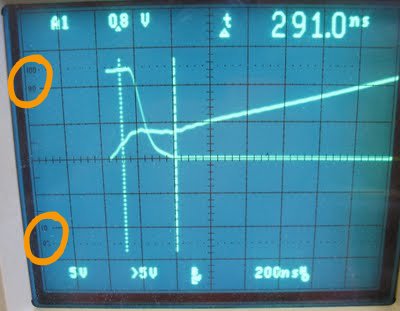
  • 10-90 marks to the far left of the screen --> line signal up at 0-100 (use "var" [see Fig. 2] to resize voltage divs as needed), then use 10-90 marks + the cursors to measure 10-90% rise times
    Fig1. thanks Shane for unwittingly donating this image
  • function generator has "sync" output --> trigger off of that
  • "to give yourself some more time to make the measurements, you can increase the intensity of the beam so the persistence lasts longer. Also triggering off of the signal generator's 'sync' line can help produce more regular triggering. The scopes generally trigger better on high frequency signals, so for those measurements that are not frequency dependent, using higher frequency input signals may produce results that are easier to handle."
Lab 1B
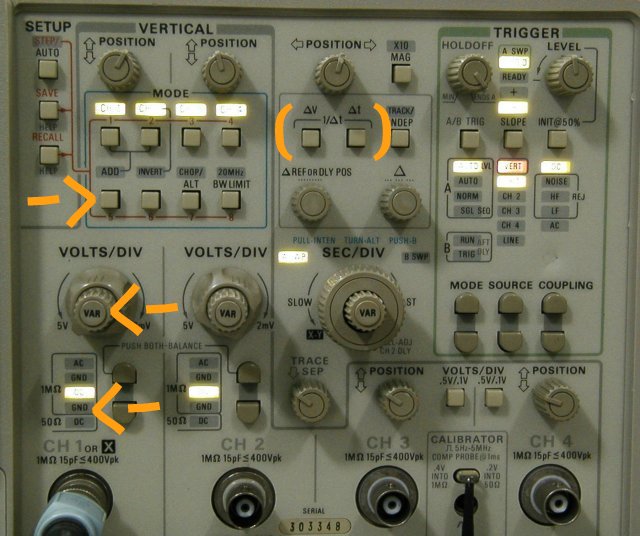
Fig 2. thanks Lim Siong Boon for unwittingly donating this
  • if you have more than one output option selected, also select "chop" to show them simultaneously, otherwise scope will show one signal, then the other
  • to show "add"d result, turn off all the other buttons (it only adds ch1 and ch2, depressing those buttons does not help it)
  • no need to unplug the scope probe, simple switch output to "GND" to get where the ground line is (for zeroing)
  • Not a oscope tip, but 
    • wrt the amp: there are rail-to-rail amps and the other ones are almost rail-to-rail. the amp / rails limits how fast your system responds at high freqs
    • impulse = frequency response because in Laplace = 1, aka sweeps all the freqs
    • step is just frequency response settled to DC
    • voltage driven, response to input limited by back EMF; current-driven, not so
List will be updated as term goes on

Saturday, December 17, 2011

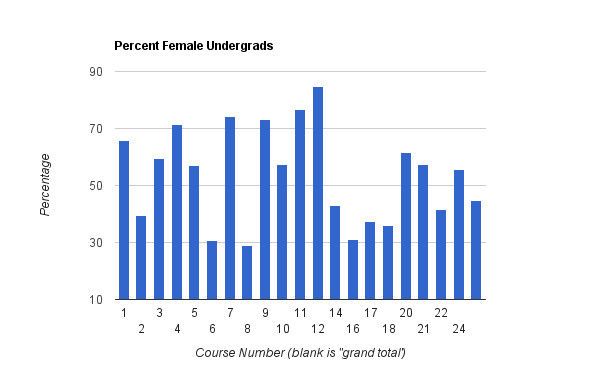
MIT Course Majors Male Female Ratio, Fall 2011 (scraping with google docs)

as seen at stata; click to see larger pic
when i saw this in stata a few days ago i legitimately wondered for a few seconds which way this was color-coded until I saw a note (cropped out in this pic), which made me smile. At MIT and hopefully in the general world the imperfect gender ratios are really not so noticeable unless you're looking for it. MIT is wonderful (I say this now because I have no finals this term, all project classes that I loved even if I didn't do as well as I'd've liked)

Anyway, there were no citations! so I decided to go off and investigate on my own and treat it as a data visualization exercise (hi, upcoming IAP / startlabs / c2c / metrify).

EDIT: Derp! I data-failed. You can see civil/environmental engineering (course 1 -- see http://web.mit.edu/catalog/subjects.html if you're confused by the numbers) is definitely off. : / messed up copying and pasting somewhere. Will redo this for realz one day (they have data for multiple years, I want to clean it up automatically).


sorted by %
sorted by course number

~~

http://www.quora.com/MIT-1/What-is-the-gender-ratio-for-each-of-the-majors-at-MIT
data source
Here's the data I used (I should just email them for the csv's, but I thought this would be a simple data scraping exercise):
http://web.mit.edu/registrar/stats/gender/index.html
http://web.mit.edu/registrar/stats/yrpts/index.html
What tripped me up is that the women vs. everyone listing of majors is ever so slightly off, and I have to decide how many distinctions I want to make. Do I really care about 2 vs 2A? not really. If I care about 6-1 vs 6-2 vs 6-3, do I just drop 6-7?

assorted google spreadsheets of data from those sources
cleaned data for charts
https://docs.google.com/spreadsheet/ccc?key=0Atr0HZeoMbmgdHFNZU5mbEdYU2VIOE1BUTRLZHJJVkE

raw data sorted for female / undergards
https://docs.google.com/spreadsheet/ccc?key=0Atr0HZeoMbmgdFg0Vk14RW9JQjJtSFFsMXJBZ2hnSEE

raw scraped html table data
https://docs.google.com/spreadsheet/ccc?key=0Atr0HZeoMbmgdFYzNUdEN2NKM2lGbHV6OVN4YkJNTmc

where i tried to (see script editor) automagically clean up the data and failed:
https://docs.google.com/spreadsheet/ccc?key=0Atr0HZeoMbmgdFRkSXp5SW9teEJiT0t5U2FJeTBUVnc&hl=en_US#gid=0

the
google apps code 
I used for that last gdoc
function loadImport() {
  var ss = SpreadsheetApp.getActiveSpreadsheet();
  var sheet = ss.getActiveSheet();
  var data_sskey = "0Atr0HZeoMbmgdFYzNUdEN2NKM2lGbHV6OVN4YkJNTmc";
  var row_init = "13";
  var col_ug = "G";
  var col_grad = "M";
  var col_total = "O";
  var col_courseName = "A";
  var col_courseNumber = "Q";
  
  var cols = [col_ug, col_grad, col_total];
  //create arrayformulas for copying selected data over
  //e.g. =ImportRange("0Atr0HZeoMbmgdFYzNUdEN2NKM2lGbHV6OVN4YkJNTmc","Women!G13:G")
  
  //Add Course Names
  var finalRanges = [  '=ImportRange("' + data_sskey + '","Women!' + col_courseName + "13:" + col_courseName+ '")'];
  
  //Add Enrollment Data in alternating female / all 
  for (var i = 0; i < cols.length; i++){
    femRange = '=ImportRange("' + data_sskey + '","Women!' + cols[i] + "13:" + cols[i]+ '")';
    finalRanges.push(femRange);
    everyoneRange = '=ImportRange("' + data_sskey + '","Everyone!' + cols[i] + "13:" + cols[i]+ '")';
    finalRanges.push(everyoneRange);
  }
  
  //Add Course Numbers
  finalRanges.push('=ImportRange("' + data_sskey + '","Women!' + col_courseNumber + "13:" + col_courseNumber+ '")');

  
// Sets the column header names to match copied data.
//sheet.getRange("A1").setValue(range);
  var columnNames = ['Course Name', 'Fem UG', 'All UG', 'Fem Grad', 'All Grad', 'Fem Total', 'All Total', 'Course Number'];
  var headersRange = sheet.getRange(1,1,1,columnNames.length);
  headersRange.setValues([columnNames]);
    //var dataRange = sheet.getRange(2,1,1,columnNames.length);
  for (var j = 0; j < columnNames.length; j++){
   sheet.getRange(2, j+1).setValue(finalRanges[j]);
  }

}
//method getRange(row, column, optNumRows, optNumColumns)


Google Docs Scripting Tutorials
An excellent step-by-step free tutorial on ImportXML (similar to importHTML that I used), how I heard of xpath (which I didn't end up need to use due to importHTML magic): http://www.distilled.net/blog/distilled/guide-to-google-docs-importxml/
other useful tutorials I referred to
http://blog.ouseful.info/2008/10/14/data-scraping-wikipedia-with-google-spreadsheets/
http://blog.fastfedora.com/2011/08/how-to-use-open-apis.html *shudders* speaking of government apis, I really should be less terrible and fix my github codeforamerica repos which I left half-finished. AUGH. I FAIL. This is why I haven't applied to any jobs yet. Upcoming: post on why you shouldn't hire me (with the caveat that I feel okay listing these because these are past mistakes that I don't intend to make again).
http://blog.ouseful.info/2010/02/15/creating-a-winter-olympics-2010-medal-map-in-google-spreadsheets/
eeee shiny http://pipes.yahoo.com/pipes/
I also attempted to use google fusion tables but did not have a good experience.
http://code.google.com/googleapps/appsscript/articles/writing_spreadsheet_data.html
http://code.google.com/googleapps/appsscript/service_spreadsheet.html
To investigate: http://www.propublica.org/nerds/item/using-google-refine-for-data-cleaning

Tuesday, December 13, 2011

eagle persistent hotkeys / emergency h bridge WIP

to get
persistent keyboard shortcuts / hotkeys in eagle, 
since eagle's UI leaves something to desired for me
you need to add lines to the eagle.scr file in the "scr" folder of your eagle installation
e.g. for my windows desktop that is: "C:\Program Files (x86)\EAGLE-5.11.0\scr\eagle.scr"
here's what mine's set at:

# Configuration Script
#
# This file can be used to configure the editor windows.

# eagle Configuration Script -- persistent hotkeys
# nancy ouyang
# 13 dec 2011
Assign F1 'wire';
Assign F2 'move';
Assign F3 'del';
Assign F4 'group';
Assign F5 'name';
Assign F6 'label';
Assign F7 'value';
Assign F8 'copy';


Assign AF1 'route';
Assign AF2 'ratsnest';
Assign AF3 'rip';


emergency high-power h bridge
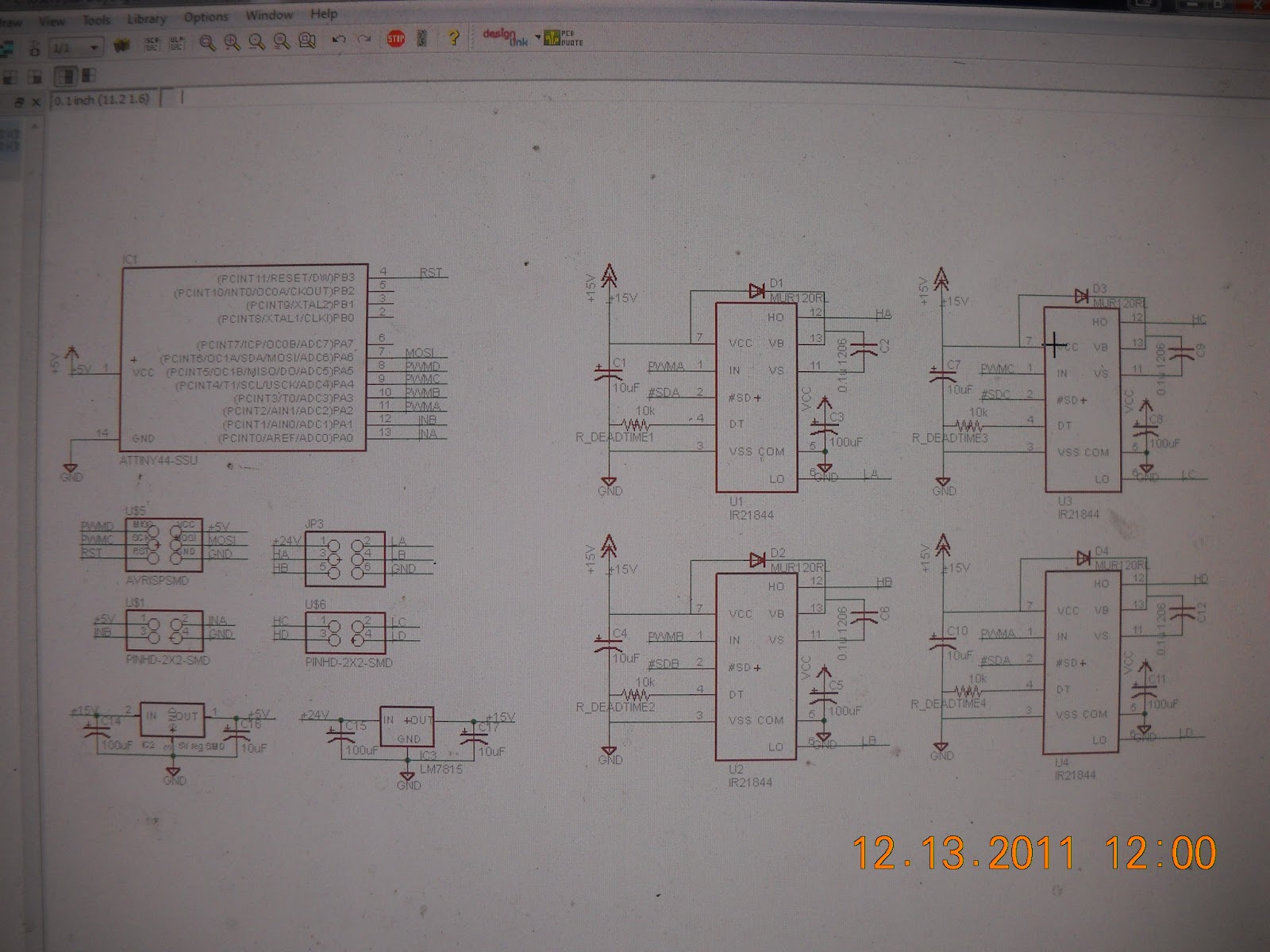
is in progress and due in oh 18 hours or so (still need to finish schematicking). because i'm actually rich (i live off of instant noodles because i'm a cheap student and would much rather spend the money on delicious components for projects), or at least i feel rich when immersed in the general uh resourceful atmosphere of MITERS / east campus, i bought delicious power components. (as opposed to relying on 6.131 lab ones).

anyway so I emergency learned myself some theory. as usual with my schoolwork, the path of this project went "i'm really lost, but too proud to ask for help so let me confuse myself on the internet". several days later, i feel distinctly antisocial and hopeless and take lots of naps. a few days before the deadline, i start trying to do something and gradually i go "whoa it's starting to make sense." then i go "whoa maybe there is hope after all! I should try to complete this in time" followed by "AAAHHH this is due in [too little time] emergency project!!1!1!!"

current WIP progress (clearly not finished and there are errors, need more buscap, mislabeled components,  etc) --


i referenced shane colton's hexbridge / other motor controllers and charles guan's tinytroller / other motor controllers.

h bridge links
that i used to read up on everything i was supposed to already know:
http://robotechno.us/high-current-h-bridge-with-mosfet.html

this is a good speedy intro to why+ theory + practicals of making your own h-bridge (n+p mosfet design, as opposed to nmosfet-only w/ driver)
http://roko.ca/robotics/h-bridge-fundamentals/1

more links here
http://www.opencircuits.com/Motor_driver

===misc links===
using chip http://www.robotroom.com/HBridge.html + thermal data http://www.robotroom.com/Thermal-PCB-Motor-Driver-Tests-4.html
steppers http://www.massmind.org/techref/io/stepper/hipwrbp-gm.htm
dc motors overview http://www.electronics-tutorials.ws/io/io_7.html
robot power http://www.robotpower.com/downloads/
stepper drivers http://www.nerdkits.com/forum/thread/694/
more reference yay open source hardware http://www.robotpower.com/products/osmc_info.html
stepper and motor control math!theory http://www.divms.uiowa.edu/~jones/step/circuits.html
lots of different h bridge implementations (schematics) http://circuitelec.blogspot.com/2009/07/h-bridge-motor-driver-circuit.html
look, half bridge can be reversible if you have negative rails (terminology ftw) http://www.me.berkeley.edu/ME102/lab3.html
steppers i have access to http://store.makerbot.com/nema-17-stepper-motor.html
because the awesome built in delay fet driver http://www.irf.com/product-info/datasheets/data/ir2184.pdf
==more specific to me links==
http://search.digikey.com/us/en/products/2318-H-RC/M8842-ND/775381?wt.z_cid=ref_octopart_dkc_buynow
http://web.mit.edu/6.131/www/data.shtml
https://docs.google.com/document/d/1deiPGEL8JOQlO9pS5STD-jABaiG5eQzZwwNh8GDAdqQ/edit?hl=en_US
Half-Bridge Circuit Behavior by Dennis L Feuch
http://search.digikey.com/us/en/products/IRFB3207ZPBF/IRFB3207ZPBF-ND/1300656
http://www.etotheipiplusone.net/pics/fvm_3ph.png
http://etotheipiplusone.net/pics/seg/seg_74.jpg
http://www.etotheipiplusone.net/?p=642
http://web.mit.edu/first/kart/controller_rev1.pdf
http://scolton.blogspot.com/search/label/hexbridge
=====


wish me luck...

Monday, December 5, 2011

Hardware Search Engines

Previously I daydreamed about octopart for meche; turns out I spoke too hastily. There are supplies search engines which exist already, though they're not as cool as octopart IMHO :) Well, none of them have customer reviews like google shopping anyway.

While hunting for spring suppliers (as opposed to making the springs myself, which may work but I'm not sure), I ran across globalspec and then I used one of those "similar sites" search engines to find several hardware supplier search engines.

In rough order of relevance / how much I liked them:
  • http://www.thomasnet.com/prodsearch.html
    • Search ThomasNet to find manufacturers, distributors and service providers - from Actuators to Zirconium and everything in between.
    • geographical, not just by state but by "within x miles"
    • has whitepaper and some explanations at taxonomic levels -- on the K-12 level sort of explanation
  • http://www.globalspec.com/
    • The Engineering Search Engine
    • has a taxonomy of sorts "browse products and suppliers"
    • get "register" nagging :///
    • has geographical locations with maps, so I can search for local suppliers of springs
    • as an "application notes" search, presented as search results (not nicely), and also 1-sentence explanations of things (although has descriptions at a slightly "deeper" level than thomasnet, I feel)
  • http://www.engnetglobal.com/
    • EngNet® ... to enable Engineers, Technicians, Tradesmen, etc. to find information and communicate effectively with suppliers in the Engineering Industry. [...] provides a searching facility free of charge to users
    • more varied taxonomies / ways to browse (by industries, by engineering discipline, products/services, brandnames)
    • no "extra explanation" details, solely listing
  • http://www.amazon.com/industrial-scientific-supplies/b?ie=UTF8&node=16310091
    • pointed out to me by octopart person brian newbold yay
  • http://www.directindustry.com/ 
    • The Virtual Industrial Exhibition -- more 
    • also has taxonomy
    • more of an index of companies
    • no geographical
  • http://www.engineering.com/Products.aspx
    • directory of companies
  • http://www.engineersedge.com/engineering/Products_Directory/
    • ugly interface, no specific search, and too many ads, IMHO
  • http://www.interfacebus.com
    • web 1.0 Text link directly ftw. Taxonomy + search via google. Cleaner than engineers edge (less ads all over the place)

Engineering reference sites:
  • http://www.efunda.com/home.cfm Efunda
    • eFunda stands for engineering Fundamentals. Its mission is to create an online destination for the engineering community, where working professionals can quickly find concise and reliable information to meet the majority of their daily reference needs.
    • Nicely designed interface and information is cleanly presented :D makes me want to nom nom info
  • http://www.engineeringtoolbox.com/
  • http://kmoddl.library.cornell.edu/index.php
    • Kinematic models! Oh man, I can look at pretty mechanisms online. <3 delicious.
  • http://www.electronics-tutorials.ws/
    • because the awesome. so true, what that "thank-you" video guy said re: Khan's videos and what advantages videos offer over humans (besides freeing up time for knowledge-bearers to not just lecture but help people one on one):
      • And some of those videos I watched over and over twenty of thirty times until I got it. I don't think there's a tutor in the world that I could pay who would repeat the same thing twenty or thirty times without getting at least a little bit judgmental.
    • asdlfkj yes. This, professors, is why -- even if it encourages people to be truant -- why lectures should be recorded. Guess what? I'm not going to get it the first time. 
Also, octopart competition? o__o  Sort of.
  • http://www.findchips.com/
    • "Welcome to the original and fastest electronic part finder and chip search engine. FindChips electronic components search engine scours the leading distributors to give you instant inventory levels and pricing around the world."
    • Well designed, displays key data very cleanly and good for checking component specs, not just sourcing suppliers, but clearly for people who know exactly what they want. Does not provide octopart's (perhaps amazon inspired?) extremely flexible and awesome search-by-specification that allows you to browse components

random link dumps:
http://engineeryourlife.org/ designed to convince girls to be engineers

====
spring suppliers, search:
http://www.hardwareproducts.com/ -- MA but rather bad online catalog browsing interface
http://www.planetspring.com -- online spring design calculator, not quite sure how it links to ordering yet, seems to have a weekly or monthly fee? *confused*

and linking this again b/c I keep forgetting to read it: RFID explained http://www.morganclaypool.com/doi/abs/10.2200/S00040ED1V01Y200602MPC001

===
also, a bit late for me, but some electromagnet force calculators
still need to learn how to use FEMM